3.1 Core System
The Ledge System is built around a robust detection and validation pipeline designed to handle complex geometry reliably.
While the core system is fully customizable, we recommend understanding how it works before making modifications.
Ledge Detection Data
LedgeDetectionData is a ScriptableObject that defines all parameters used for detecting and validating ledges.
It includes settings such as:
- Detection distances
- Surface thresholds
- Hand position offsets
- Validation constraints
Take time to review this asset, as it directly affects how ledges are identified and filtered.
Ledge Handler
The core of the system is the LedgeHandler.
This class performs all major calculations and physics checks required to define a valid ledge.
Required Input
To calculate a ledge (CharacterLedge), the system requires:
-
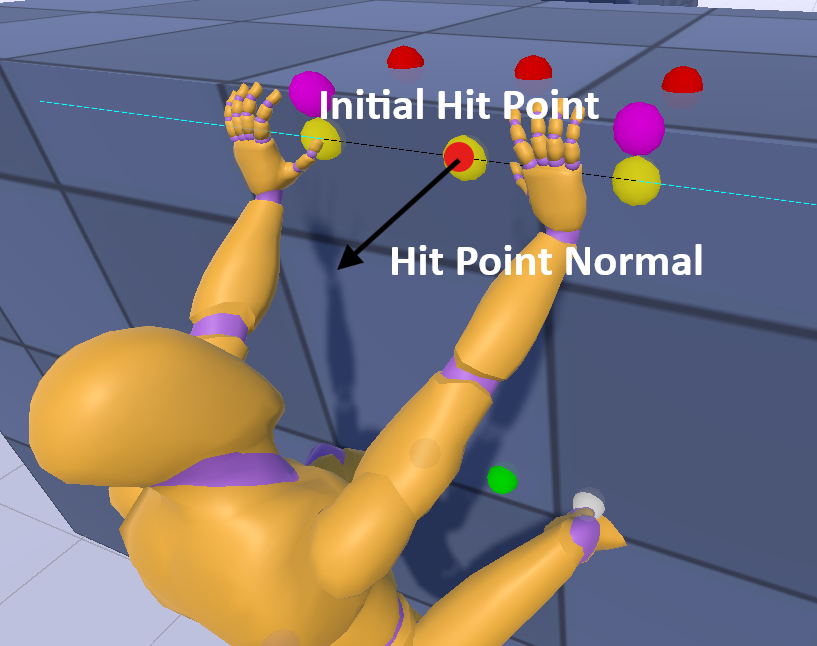
Initial hit position
A point near the edge of the ledge on the wall surface -
Initial hit normal
The surface normal of the wall
In the image below:
- The red pentagon represents the hit position
- The blue arrow represents the hit normal
Calculation Pipeline
Using this input, LedgeHandler performs a series of calculations to construct a CharacterLedge.
This includes:
- Determining ledge orientation
- Calculating hand positions
- Estimating player alignment
- Evaluating surrounding geometry
Validation
Once a candidate ledge is calculated, it is validated to ensure it is usable.
Validation checks include:
- Surface angle (rejects steep or invalid surfaces)
- Ledge depth (ensures enough space to grab)
- Geometry continuity (avoids unstable edges)
- Sufficient space for both hands
- Whether the ledge is climbable
If validation fails, an error code is returned to indicate the reason.
Only valid ledges proceed to the next stage.
CharacterLedge Output
If successful, the system outputs a CharacterLedge containing:
- Player capsule position
- Left and right hand positions
- Ledge normal
- Surface normal
- Climb data (if applicable)
This data provides everything needed to:
- Align the player to the ledge
- Apply positional offsets
- Drive animation and IK systems
Why This Approach Works
This pipeline avoids common issues such as:
- False positives on flat walls
- Snapping to invalid geometry
- Misaligned grab positions
It is designed to be reliable, modular, and adaptable to different gameplay styles.
Debug Visualization
- Debug visualization is enabled by default, drawing rays and position identifiers for detected ledges.
- Useful information about ledges is also logged to the Console window.
- The
LedgeSystemDebugclass is responsible for drawing the rays and printing these logs. - Debug visualization can be toggled on or off via Tools > Ledge System > Toggle Debug. For deeper customization, you can modify the
LedgeSystemDebugclass directly.
Next Steps
- See Runtime Components to understand how this is used in practice
- Explore Examples for a complete implementation