4. Examples
This section showcases working setups using the Ledge System.
Use these examples as a reference when integrating the system into your own project.
Sample Character
The LedgeAgent_Sample_Character prefab demonstrates a complete working implementation.
It includes:
- Ledge detection
- Movement along ledges
- Climbing up
- Dropping
- Jumping away (Braced Only)
- Hopping up (Braced Only)
Braced vs Free
-
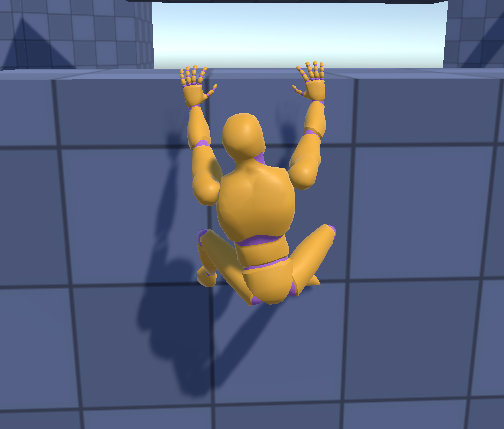
Braced — the player model braces its feet against the wall below the ledge.
-
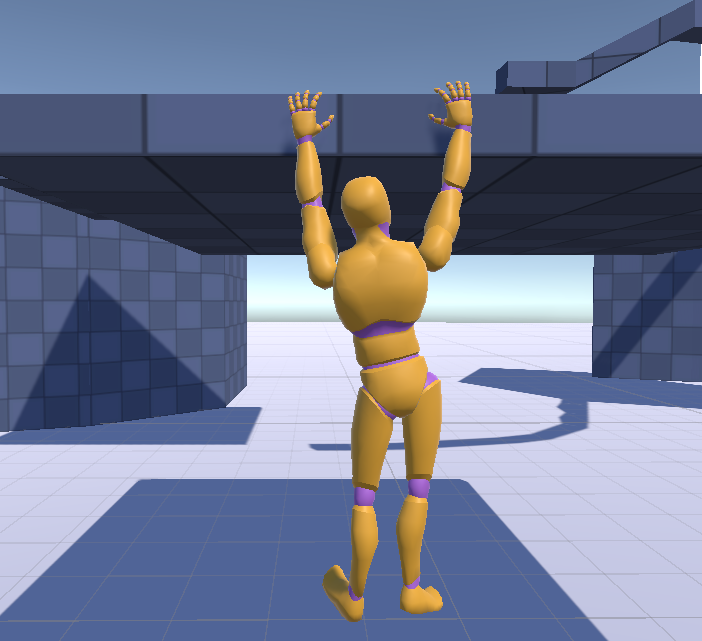
Free — the player model hangs fully, holding itself up with its hands only.
Demo Scene Overview
The demo scenes are set up to test different ledge scenarios.
They include:
- Straight ledges
- Inner corners
- Outer corners
- Varying heights
Basic Setup Flow
To quickly test the system:
- Add the
LedgeAgent_Sample_Characterto your scene - Ensure ledge surfaces are on the correct layer
- Press Play
- Approach a ledge while airborne
You should see the character snap to a valid ledge.
The Big Picture
Before going through each movement module one at a time below, here's the whole lifecycle in a single pass — the same sequence you just tested in Basic Setup Flow above, described step by step. Terms like event or root motion are defined in the Glossary if you need a refresher.
- Airborne, approaching a wall — the character isn't touching a ledge yet. Phase:
None. - Detection —
DetectLedgeMovefires two rays at the wall. If they hit the pattern of a valid ledge,LedgeHandlercalculates one, andLedgeAgent.EnableLedgeGrablocks the character onto it. - Landing — the character snaps into position on the ledge while it settles. Phase:
Landing, briefly. - Idle — the character is now hanging or bracing on the ledge, waiting for input. Phase:
Idle. From here, player input decides what happens next:- Move sideways → phase
Moving, then back toIdle. - Climb up (if the ledge is climbable) → phase
Climbing, thenNoneonce standing on top. - Hop up (if not climbable) → phase
JumpingUp, grabbing a ledge above if one exists, orNoneif not. - Jump away (braced only) → phase
JumpingAway, grabbing a ledge behind the character if one exists, orNoneif not. - Drop → phase
Dropping, grabbing a ledge below if one exists, orNoneif not.
- Move sideways → phase
- Back to detection — once the character is no longer holding a ledge (phase
None), it's airborne again, andDetectLedgeMovestarts looking for the next one.
Every phase name above matches the LedgePhase table in Runtime Components — worth keeping that page open side-by-side the first time you read through the six modules below.
Movement Modules
Detect Ledge
The player should be airborne when detecting ledges.
We use a two-ray system to detect potential ledges: one miss check and one hit check. (In the video below, the red line is the miss check and the blue line is the hit check.)
Detect Ledge Move Details
In short: two rays check the wall in front of the airborne character. If they form the pattern of a valid edge, the system asks for a ledge and grabs it.
DetectLedgeMoveis aBaseLedgeMovementcomponent.- When the miss check misses and hit check hits, it asks
LedgeHandlerto give a ledge position. - Information about the ledge is sent to the ledge agent by calling
LedgeAgent.EnableLedgeGrab LedgeAgentsets the ledge information and restricts movement so the movement is handled by the ledge movements.
If you want to customize this behavior, we recommend starting with LedgeAgent.EnableLedgeGrab.
You can then modify DetectLedgeMove if you want it to work differently. The two-ray hit/miss approach has proven reliable across a wide range of geometry configurations.
Remember all you need to provide for the LedgeHandler to calculate a CharacterLedge is an initial hit point close to the ledge edge and its normal.
Move Along Ledge
The player can move sideways across connected ledges. It handles curves, inclines, and declines.
Move Along Ledge Details
In short: input tells the system which side to move to, LedgeAgent works out the new hand/body positions, and a request processor streams those positions out over time so animation and IK can follow along smoothly instead of teleporting.
OnLedgeMoveis aBaseLedgeMovementcomponent that listens to player input.- When input is received, it asks
LedgeHandlerto give an updated ledge position based on the movement direction - Information about the old and new ledge positions is sent to
LedgeAgent LedgeAgentcreatesMoveRequestsand passes them toPlayerLedgeMoveRequestProcessorPlayerLedgeMoveRequestProcessorhandles movements and provides updated positions via event callbacks- The example player controller and animation system use the positions provided by
PlayerLedgeMoveRequestProcessorto handle IK and animations.
If you want to customize this behavior, we recommend starting with how LedgeAgent.MoveOnLedge creates the MoveRequests and how PlayerLedgeMoveRequestProcessor processes them.
Climb Up
When a ledge is climbable, the player can move up over it.
Climb Up Details
In short: the climb animation itself drives the character's movement (see root motion) — the code's job is just to detect that a climb should happen, and to hand the character off to normal movement once the animation finishes.
JumpClimbLedgeis aBaseLedgeMovementcomponent that listens to player input.- If the ledge is climbable, it asks
LedgeAgentto move the player up the ledge and run the associated animations. - Some movements are controlled by animation root motion. Climb is one of them.
AnimationRootMotionProxydetects that the climb animation applies root motion (viaLedgeAnimationData)- When the animation is done, the player object is moved to the target climb position (
TargetLocation) - Ledge info is flushed and the character is back in the normal state where it can detect new ledges.
- The
TargetLocationsetup and the hand-off once root motion ends are implemented inLedgeClimbReaction— see How the Example Reacts in the Background below.
If you want to customize this behavior, we recommend starting with LedgeAgent.EnableAutoLedgeClimb and LedgeClimbReaction, which builds the TargetLocation and hands it to AnimationRootMotionProxy/auto-movement.
Drop From Ledge
The player can release and fall from the ledge. If there is any potential ledge below, the agent tries to grab it.
Drop From Ledge Details
In short: on drop input, the system checks below the character for a landable ledge before committing — if one exists, the character grabs it; if not, it just falls.
DropFromLedgeis aBaseLedgeMovementcomponent that listens to player input.DropFromLedgechecks if there is any potential ledge below the player capsule.- If a potential ledge exists, its initial hit point and hit normal are calculated
- If not, nothing is calculated.
LedgeAgent.DisableLedgeGrabAndDropis called.- if potential ledge data is provided,
LedgeHandler.LandOnLedgeis called for the player to snap back onto the ledge. - if not, after a short delay ledge info is flushed and the character is back in the normal state where it can detect new ledges.
- The animation-side response (playing the drop animation, waiting to confirm landing) is implemented in
LedgeDropReaction— see How the Example Reacts in the Background below.
If you want to customize this behavior, we recommend starting with the LedgeAgent.DisableLedgeGrabAndDrop.
Jump Away (Braced Only)
The player can jump away from the ledge and rotate 180 degrees. If a potential ledge is behind the player object, the agent tries to grab it.
Jump Away Details
In short: pushing input away from a braced ledge while jumping launches the character backward. The system checks behind the character for a landable ledge before committing — if one exists, the character grabs it once it's facing the right way; if not, it just leaves the ledge.
JumpAwayLedgeis aBaseLedgeMovementcomponent that listens to player input. It is separate fromJumpClimbLedge— Climb and Hop Up share one input gesture, but Jump Away is triggered by a different input direction, so it lives in its own component.- Its execution condition checks
LedgeAgent.IsJumpAwayInputActive(), which is true when the ledge is braced, a jump is requested, and the move input points behind the agent. - When active, it checks if there is any potential ledge behind the player capsule.
- If a potential ledge exists, its initial hit point and hit normal are calculated.
- If not, nothing is calculated.
LedgeAgent.DisableLedgeGrabAndJumpAwayis called- If potential ledge data is provided,
LedgeHandler.LandOnLedgeis called for the player to snap back onto the ledge once the player character has completed a full rotation to face it. - If not, we wait until the player character has completed a full rotation, then ledge info is flushed and the character is back in the normal state where it can detect new ledges.
- The animation-side response (playing the jump-away animation, computing the target location, handing off to auto-movement) is implemented in
LedgeJumpAwayReaction— see How the Example Reacts in the Background below.
If you want to customize this behavior, we recommend starting with the LedgeAgent.DisableLedgeGrabAndJumpAway.
Hop Up (Braced Only)
When a ledge isn't climbable, the player can hop up onto it using a jump-up animation. If a potential ledge is above the player object, the agent tries to grab it.
Hop Up Details
In short: when a ledge can't be climbed, jumping plays a hop-up animation instead. The system checks above the character for a landable ledge before committing — if one exists, the character grabs it; if not, it just ends up airborne again.
JumpClimbLedgeis aBaseLedgeMovementcomponent that listens to player input. It handles Climb and Hop Up only — Jump Away is a separateJumpAwayLedgecomponent (see above).- If the ledge is not climbable, we process a hop up instead of a climb.
JumpClimbLedgechecks if there is any potential ledge above the player capsule.- If a potential ledge exists, its initial hit point and hit normal are calculated.
- If not, nothing is calculated.
LedgeAgent.DisableLedgeGrabAndJumpUpis called- If potential ledge data is provided,
LedgeHandler.LandOnLedgeis called for the player to snap back onto the ledge. - If not, after a short delay, ledge info is flushed and the character is back in the normal state where it can detect new ledges.
- The animation-side response (playing the jump-up animation, waiting for the right moment to confirm landing) is implemented in
LedgeJumpUpReaction— see How the Example Reacts in the Background below.
If you want to customize this behavior, we recommend starting with LedgeAgent.DisableLedgeGrabAndJumpUp and LedgeJumpUpReaction.
Animations
LedgeAnimationData
This is a ScriptableObject that references an animation state in the animation state machine.
- Whether this animation should apply root motion.
- Whether this animation should start or stop IK.
- Timing variables for the animation.
AnimationRootMotionProxy
This is a MonoBehaviour that has a reference to a list of LedgeAnimationData and checks:
- If the currently running animation is part of the defined list of
LedgeAnimationData - If so, it checks whether that
LedgeAnimationDataapplies root motion, and if so, takes control of the position update from theIAnimationRootMotionConsumer(in this case ourPlayerController) - It checks if the IK should be enabled/disabled and if so makes sure it is enabled/disabled at the right time.
How the Example Reacts in the Background
Skip this section if you just want to tweak an animation, speed, or offset — those live in
LedgeAgentDataandPlayerAnimationController, no architecture knowledge required. Come back here only if you're adding a new move type, or replacing how animation/movement is driven entirely.
The Core and Runtime layers only ever do one thing: figure out the current LedgePhase and fire LedgeAgent.OnContextChanged whenever it changes. They have no idea whether you're driving the result with animation root motion, a kinematic controller, or a ragdoll — that decision is entirely yours.
PlayerController doesn't hardcode that decision either. It doesn't ask "what phase are we in now, what do I do about it?" in one big switch statement. Instead, each phase has its own small component that watches for the one phase it cares about and reacts to it — the same "one component, one job" idea already used by BaseLedgeMovement on the Runtime side, just applied to the animation/reaction side of things.
The pieces
RootMotionLedgeReaction— an abstractMonoBehaviour, the base class for every reaction. OnInitialize(), it resolves its shared dependencies (theLedgeAgent, thePlayerAnimationController, a small motion-state contract) and subscribes toLedgeAgent.OnContextChangeditself.LedgeClimbReaction,LedgeJumpUpReaction,LedgeJumpAwayReaction,LedgeDropReaction— one concrete component per phase. Each declares which phase it owns viaHandledPhase. WhenOnContextChangedfires, the base class checks the new phase againstHandledPhaseand only callsReact(ledgeContext)on the component that matches — every other reaction on the character simply ignores the event.ICharacterMotionController— a narrow contract thatPlayerControllerimplements, exposing only what reactions need: setting velocity, reading the current animation velocity, and setting the root motion target. Reactions never reach intoPlayerController's private fields directly — this contract is the only door in.OnMoveEnd()— called once the animation-driven (root motion) movement for that phase finishes. This is how, for example,LedgeClimbReactionknows the climb animation has finished and it's time to hand the player off toLedgeAgent.AutoMovementHandlerto complete the climb.
Why this matters if you're customizing
PlayerController.Start()does exactly one thing for all of this:GetComponentsInChildren<RootMotionLedgeReaction>(), then callsInitialize()on each. It has zero knowledge of Climb, Drop, Jump Up, or Jump Away individually — it doesn't know they exist.- Adding a new reaction for a new phase (or replacing an existing one) never requires touching
PlayerController. Add a component that inheritsRootMotionLedgeReactionto the character, and it wires itself up. - If you're replacing the example entirely — your own controller, a ragdoll, whatever fits your game — you don't need any of this. Just subscribe to
LedgeAgent.OnContextChangedyourself and respond however makes sense. This component pattern is one way to organize that response, not a requirement of the system.
Customizing the Examples
The example setup is fully modular.
You can:
- Replace movement components
- Modify detection settings
- Integrate your own character controller
- Swap animation / IK systems
Recommended Next Steps
- Review Runtime Components to understand how the example is built
- Explore Core System to understand the underlying logic
- Start replacing parts with your own implementation