3.2 Runtime Components
This section describes the main runtime components of the Ledge System and how they interact.
These components are fully functional out of the box, but are designed to be modular and extensible.
Ledge Agent Data
LedgeAgentData is a ScriptableObject that defines all configuration required for ledge interaction.
It includes:
- Movement timings
- Position offsets
- Behavior tuning parameters
Take time to review this asset, as it controls most runtime behavior.
Ledge Agent
LedgeAgent is the main MonoBehaviour responsible for interacting with the core system.
It communicates with the LedgeHandler and acts as the bridge between detection, movement, and animation systems.
Responsibilities
- Receiving
CharacterLedgedata from the system - Controlling the player state while on a ledge
- Managing transitions (grab, move, drop, climb)
- Providing data for IK systems
Ledge Phases
Everything the system does boils down to a single LedgePhase value, stored on LedgeContext. Whenever it changes, LedgeAgent fires its OnContextChanged event — this is the one signal that drives animation, movement, and anything else that needs to know "what is the character doing on this ledge right now."
| Phase | Meaning |
|---|---|
None | Not interacting with a ledge. |
Idle | Holding a ledge, not moving, waiting for input. |
Landing | Just grabbed a ledge and is settling into position. |
Moving | Moving sideways along the ledge. |
Interrupted | A sideways move did not complete successfully. |
Climbing | Climbing up and over a climbable ledge. |
Dropping | Releasing and falling from the ledge. |
JumpingUp | Hopping up onto a ledge above (non-climbable). |
JumpingAway | Jumping backward, away from the ledge. |
You'll see these names throughout the Examples page — every movement module and every reaction component exists to detect or respond to one of these phases. If you only remember one table from these docs, this is the one worth bookmarking.
Setup
Add the following components to your player:
LedgeAgentLedgeAutoMovementHandlerPlayerLedgeMoveRequestProcessor(or your ownILedgeMoveRequestProcessorimplementation)
Assign:
LedgeAgentDataLedgeDetectionData
Important: Incorrect data setup is the most common cause of issues.
Ledge Movement
The system is modular. Each movement type is implemented as a separate component.
The provided LedgeAgent_Sample_Character supports:
- Ledge detection
- Moving sideways
- Jumping away
- Climbing up
- Dropping
Each behavior can be replaced or extended.
Movement Architecture
- Each movement type inherits from
BaseLedgeMovement - Each movement defines its own execution conditions
- Movement components are attached to the player
In the sample setup, these are organized as child prefabs:

Ledge Detection
The system uses a two-ray approach to identify valid ledges.
Ray Setup
- Upper Ray (Miss Check)
- Lower Ray (Hit Check)
Detection Rule
A ledge is detected when:
- Upper ray does not hit the Grab Layer
- Lower ray does hit the Grab Layer
This produces a valid candidate for the LedgeHandler.
Ledge Data
The system calculates a CharacterLedge, which includes:
- Position
- Normal
- Direction
Each value is calculated for:
- Center
- Left
- Right
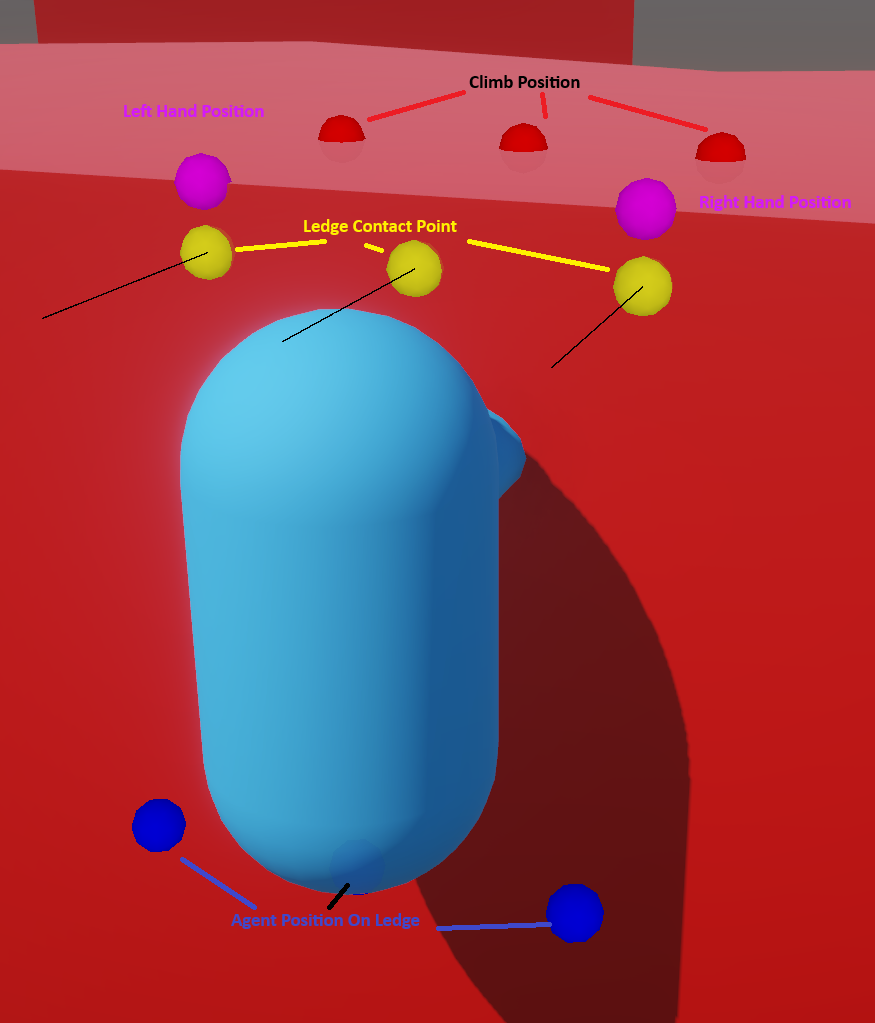
Moving Along a Ledge
When moving sideways:
LedgeHandler.TryMoveToSidecalculates a new ledgeLedgeAgentmoves the player to the new position- Movement data is generated for animation and IK systems
This ensures smooth transitions across complex geometry.
IK Integration (Advanced)
The system provides movement data through MoveRequest objects.
Each request includes:
- Start position/rotation
- Target position/rotation
These are passed to an ILedgeMoveRequestProcessor, which can drive:
- IK systems
- Custom animation systems
You can fully replace this layer depending on your animation setup.
Next Steps
- Explore Examples to see full implementations